data_set |>
  pivot_longer(
    cols = columns_to_pivot,
    names_to = "var_name_for_former_column_names",
    values_to = "var_name_for_values"
)Joining Data
Lecture 7
Announcements / Reminders
Office hours are today from 1:00-3:00 on Zoom; I will share a link via a Canvas announcement
Lab 2 is now due Monday, 5/25 at 11:59pm to Gradescope
Questions about / feedback on lab yesterday?
Outline
Last Time: Started learning about data transformation via pivoting!
-
Today:
Review from last time
Joining data (working with multiple data frames)
AE-06
Recap: Pivoting
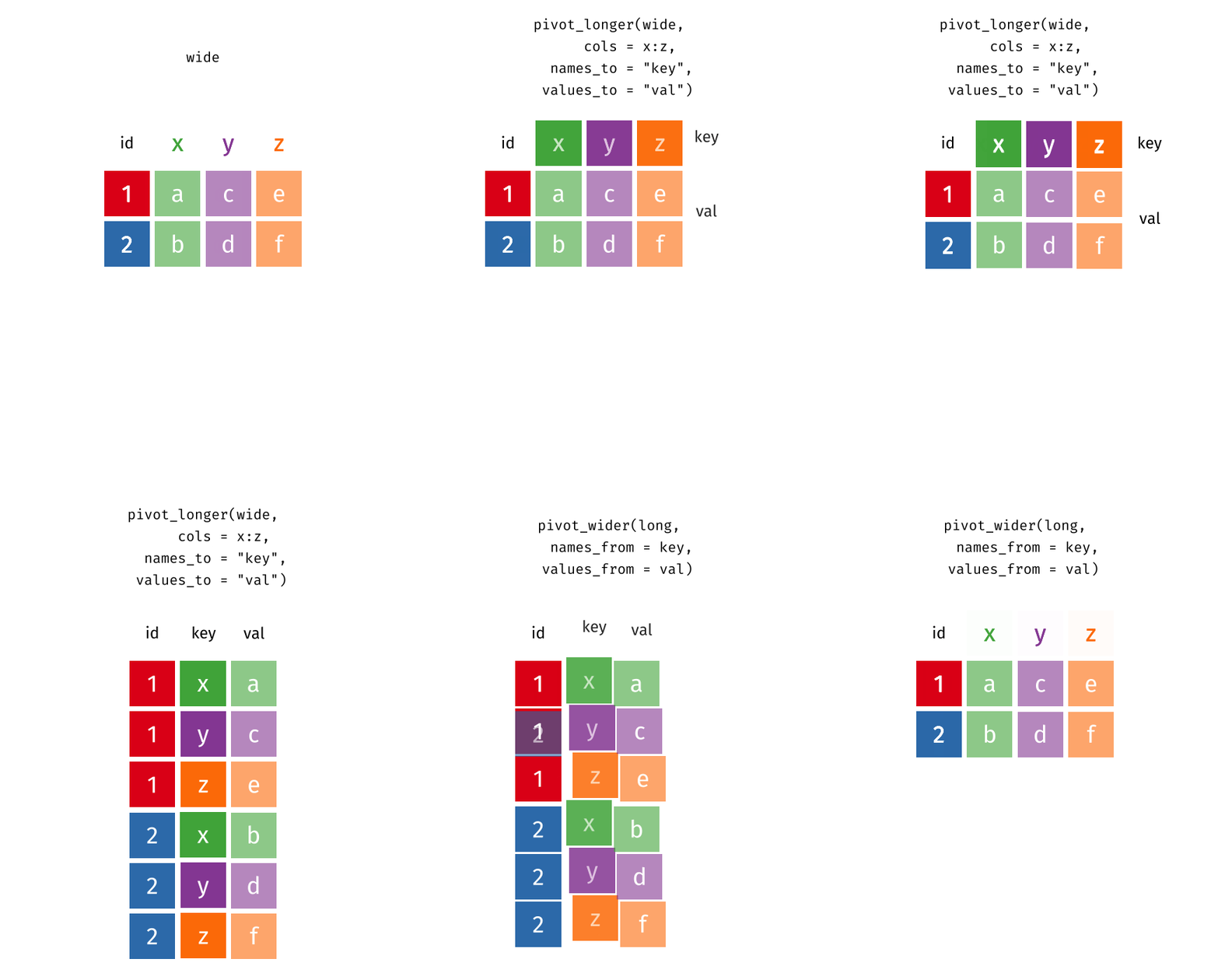
Recap: Pivot Functions
Pivot longer…
… or wider
data_set |>
  pivot_wider(
    names_from = var_name_with_desired_cols,
    values_to = var_name_with_desired_vals
  )
Joining Data
Joining Data
What happens if we want to access information from two different data sets at the same time (e.g., for EDA / plotting purposes)?
Joining Data: Sample Scenario
population# A tibble: 217 × 3
country year population
<chr> <dbl> <dbl>
1 Afghanistan 2022 41129.
2 Albania 2022 2778.
3 Algeria 2022 44903.
4 American Samoa 2022 44.3
5 Andorra 2022 79.8
6 Angola 2022 35589.
7 Antigua and Barbuda 2022 93.8
8 Argentina 2022 46235.
9 Armenia 2022 2780.
10 Aruba 2022 106.
# ℹ 207 more rowsWe want to know about population in different continents.
We could use mutate to create a continent variable, but that would be painful… we would have to manually tell R which continent each country in our df belongs to
Joining Data: Sample Scenario
population# A tibble: 217 × 3
country year population
<chr> <dbl> <dbl>
1 Afghanistan 2022 41129.
2 Albania 2022 2778.
3 Algeria 2022 44903.
4 American Samoa 2022 44.3
5 Andorra 2022 79.8
6 Angola 2022 35589.
7 Antigua and Barbuda 2022 93.8
8 Argentina 2022 46235.
9 Armenia 2022 2780.
10 Aruba 2022 106.
# ℹ 207 more rowscontinent# A tibble: 285 × 4
entity code year continent
<chr> <chr> <dbl> <chr>
1 Abkhazia OWID_ABK 2015 Asia
2 Afghanistan AFG 2015 Asia
3 Akrotiri and Dhekelia OWID_AKD 2015 Asia
4 Aland Islands ALA 2015 Europe
5 Albania ALB 2015 Europe
6 Algeria DZA 2015 Africa
7 American Samoa ASM 2015 Oceania
8 Andorra AND 2015 Europe
9 Angola AGO 2015 Africa
10 Anguilla AIA 2015 North America
# ℹ 275 more rowsJoining: Example Data
x
| id | X |
|---|---|
| 1 | X1 |
| 2 | X2 |
| 3 | X3 |
y
| id | Y |
|---|---|
| 1 | Y1 |
| 2 | Y2 |
| 4 | Y4 |
Joining: Left Join
x
| id | X |
|---|---|
| 1 | X1 |
| 2 | X2 |
| 3 | X3 |
y
| id | Y |
|---|---|
| 1 | Y1 |
| 2 | Y2 |
| 4 | Y4 |
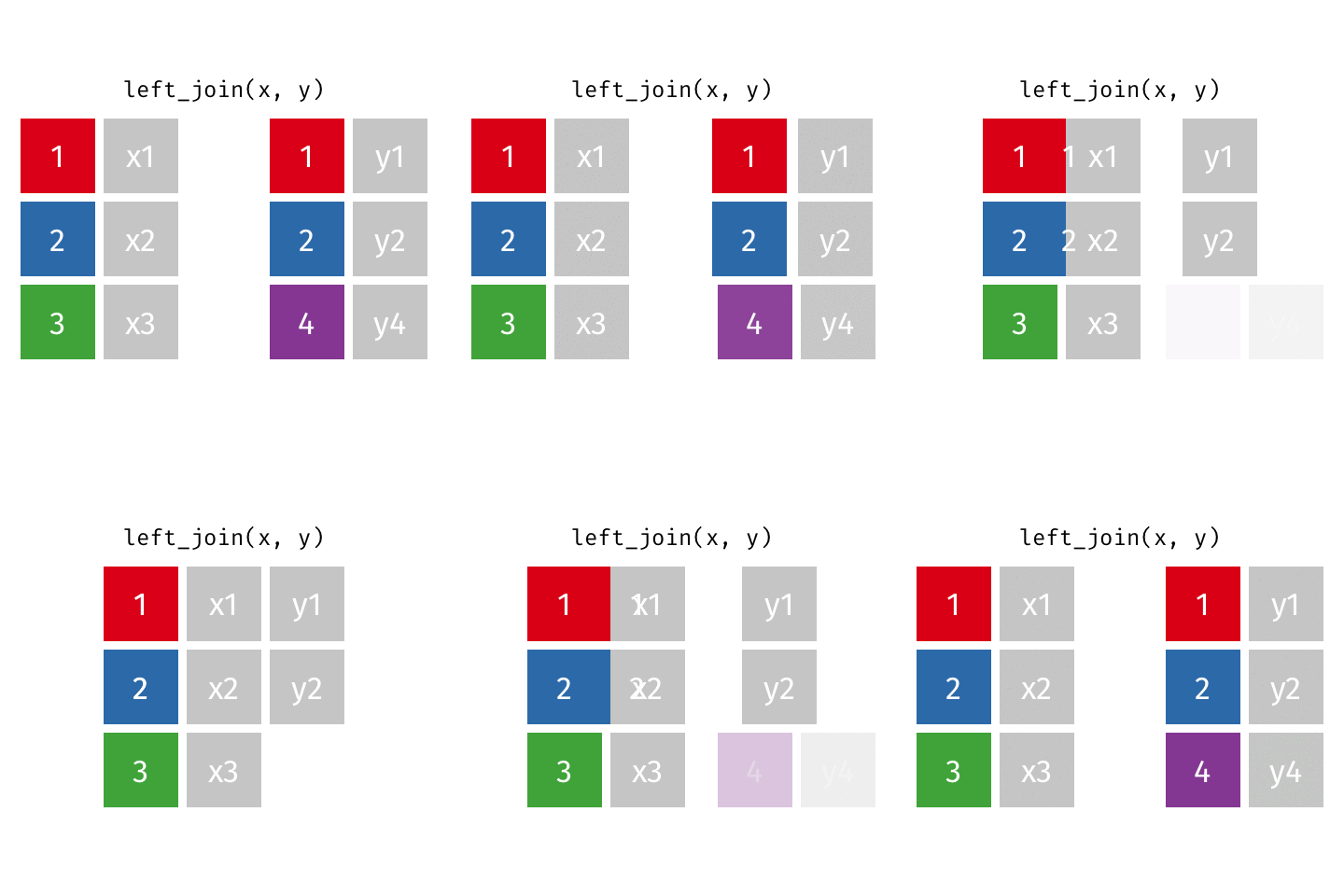
left_join(x, y)
| id | X | Y |
|---|---|---|
| 1 | X1 | Y1 |
| 2 | X2 | Y2 |
| 3 | X3 | NA |
Joining: Left Join
x
| id | X |
|---|---|
| 1 | X1 |
| 2 | X2 |
| 3 | X3 |
y
| id | Y |
|---|---|
| 1 | Y1 |
| 2 | Y2 |
| 4 | Y4 |
left_join(x, y)
| id | X | Y |
|---|---|---|
| 1 | X1 | Y1 |
| 2 | X2 | Y2 |
| 3 | X3 | NA |
Joining: Right Join
x
| id | X |
|---|---|
| 1 | X1 |
| 2 | X2 |
| 3 | X3 |
y
| id | Y |
|---|---|
| 1 | Y1 |
| 2 | Y2 |
| 4 | Y4 |
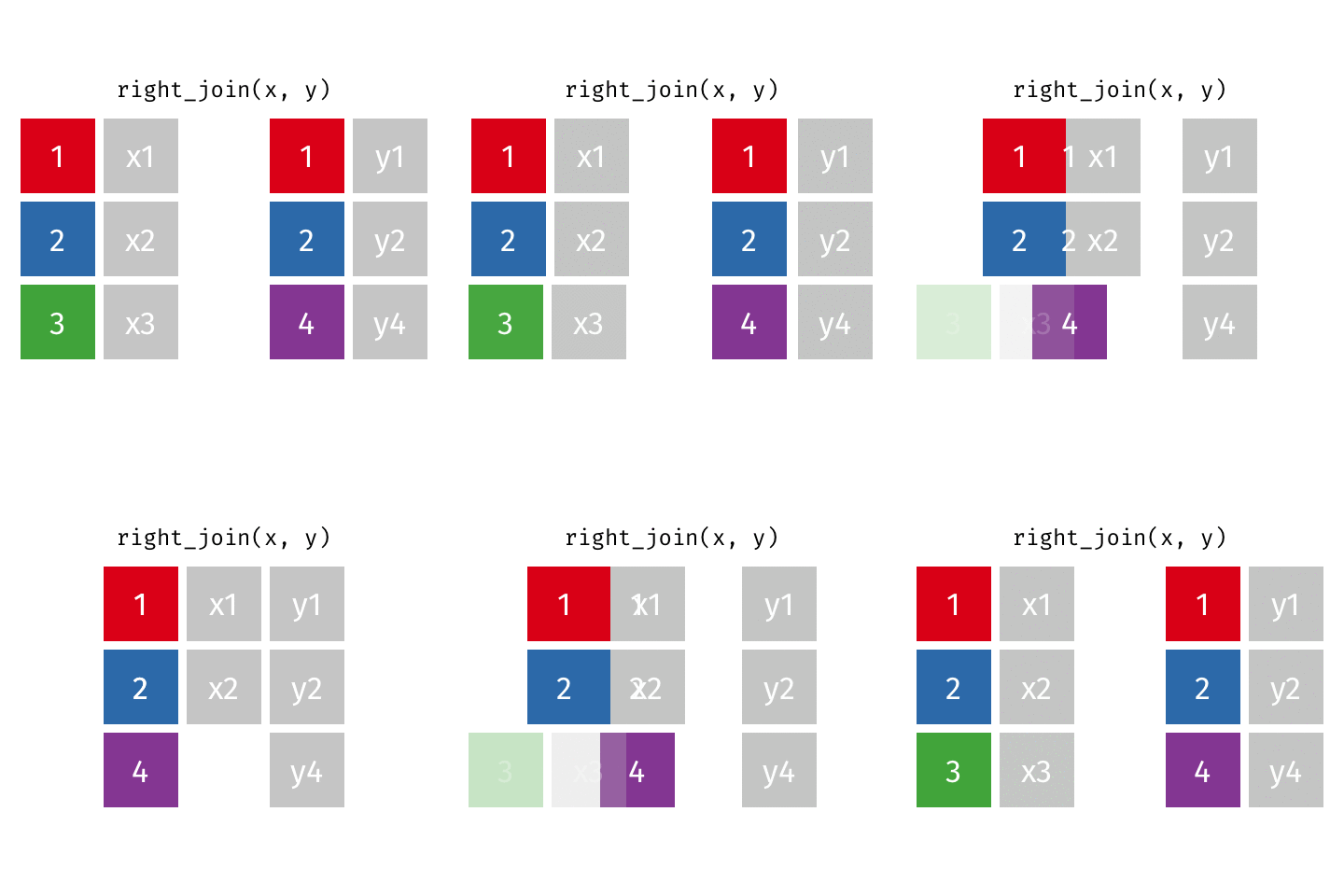
right_join(x, y)
| id | X | Y |
|---|---|---|
| 1 | X1 | Y1 |
| 2 | X2 | Y2 |
| 4 | NA | Y4 |
Joining: Right Join
x
| id | X |
|---|---|
| 1 | X1 |
| 2 | X2 |
| 3 | X3 |
y
| id | Y |
|---|---|
| 1 | Y1 |
| 2 | Y2 |
| 4 | Y4 |
right_join(x, y)
| id | X | Y |
|---|---|---|
| 1 | X1 | Y1 |
| 2 | X2 | Y2 |
| 4 | NA | Y4 |
Joining: Full Join
x
| id | X |
|---|---|
| 1 | X1 |
| 2 | X2 |
| 3 | X3 |
y
| id | Y |
|---|---|
| 1 | Y1 |
| 2 | Y2 |
| 4 | Y4 |
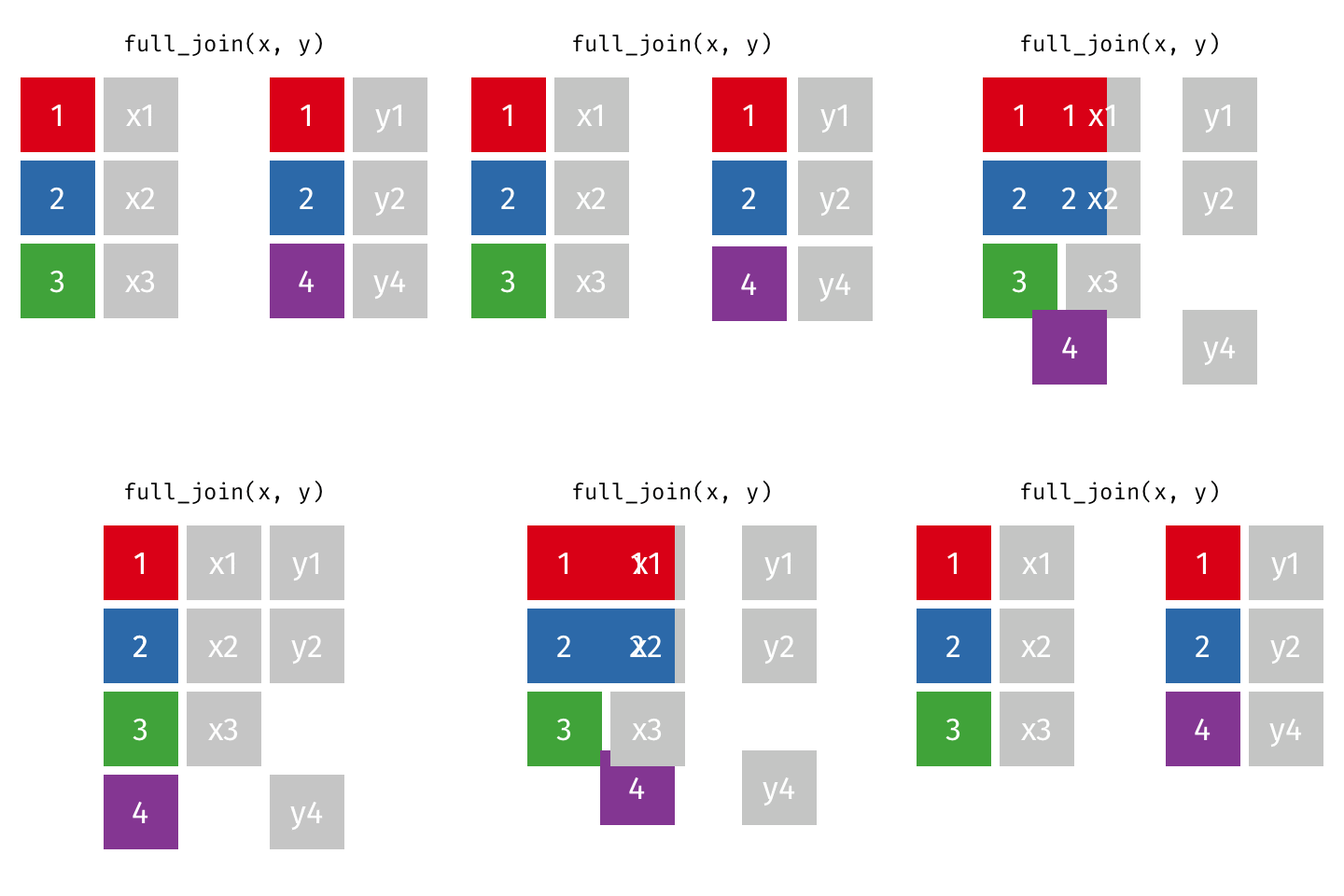
full_join(x, y)
| id | X | Y |
|---|---|---|
| 1 | X1 | Y1 |
| 2 | X2 | Y2 |
| 3 | X3 | NA |
| 4 | NA | Y4 |
Joining: Full Join
x
| id | X |
|---|---|
| 1 | X1 |
| 2 | X2 |
| 3 | X3 |
y
| id | Y |
|---|---|
| 1 | Y1 |
| 2 | Y2 |
| 4 | Y4 |
full_join(x, y)
| id | X | Y |
|---|---|---|
| 1 | X1 | Y1 |
| 2 | X2 | Y2 |
| 3 | X3 | NA |
| 4 | NA | Y4 |
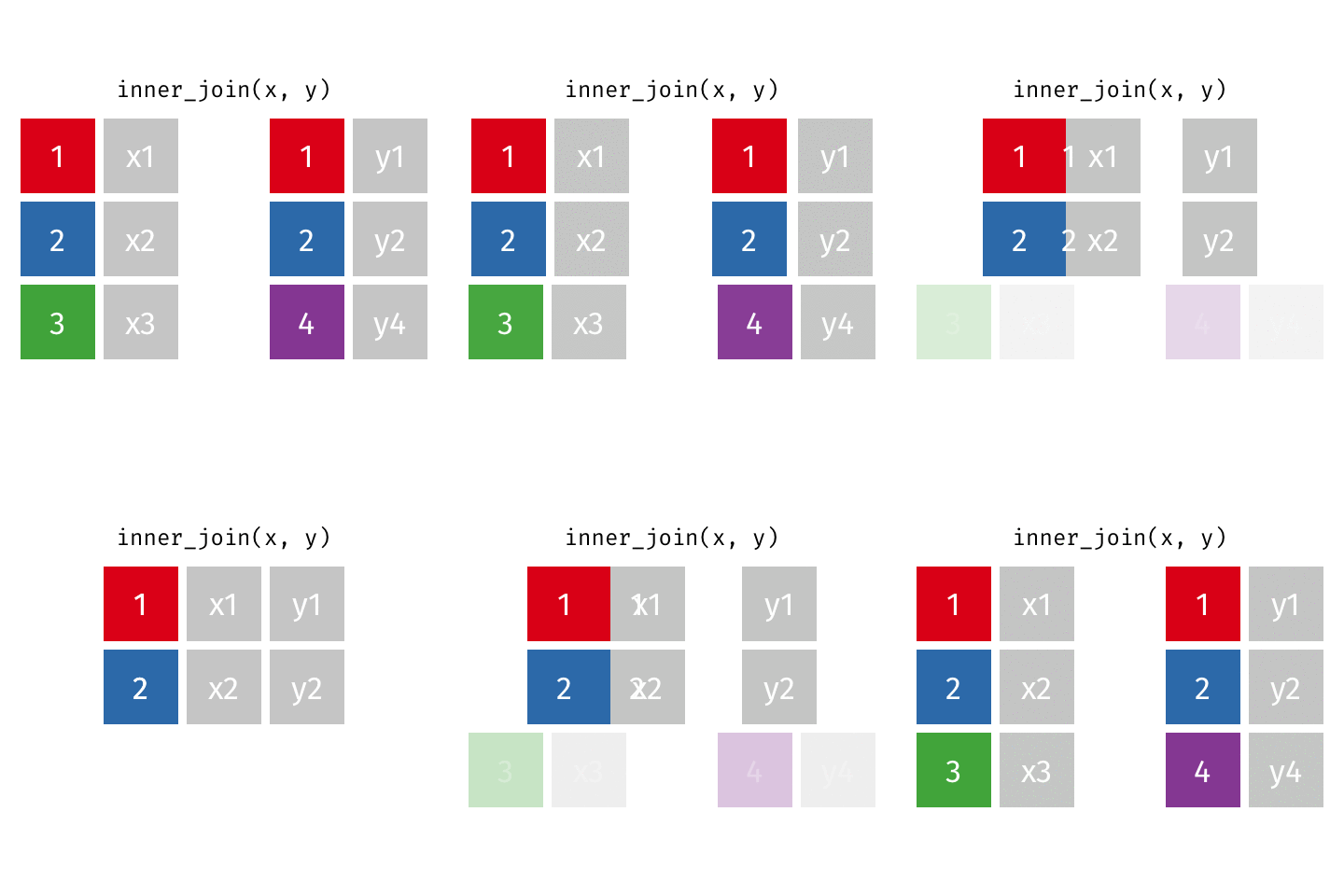
Joining: Inner Join
x
| id | X |
|---|---|
| 1 | X1 |
| 2 | X2 |
| 3 | X3 |
y
| id | Y |
|---|---|
| 1 | Y1 |
| 2 | Y2 |
| 4 | Y4 |
inner_join(x, y)
| id | X | Y |
|---|---|---|
| 1 | X1 | Y1 |
| 2 | X2 | Y2 |
Joining: Inner Join
x
| id | X |
|---|---|
| 1 | X1 |
| 2 | X2 |
| 3 | X3 |
y
| id | Y |
|---|---|
| 1 | Y1 |
| 2 | Y2 |
| 4 | Y4 |
inner_join(x, y)
| id | X | Y |
|---|---|---|
| 1 | X1 | Y1 |
| 2 | X2 | Y2 |
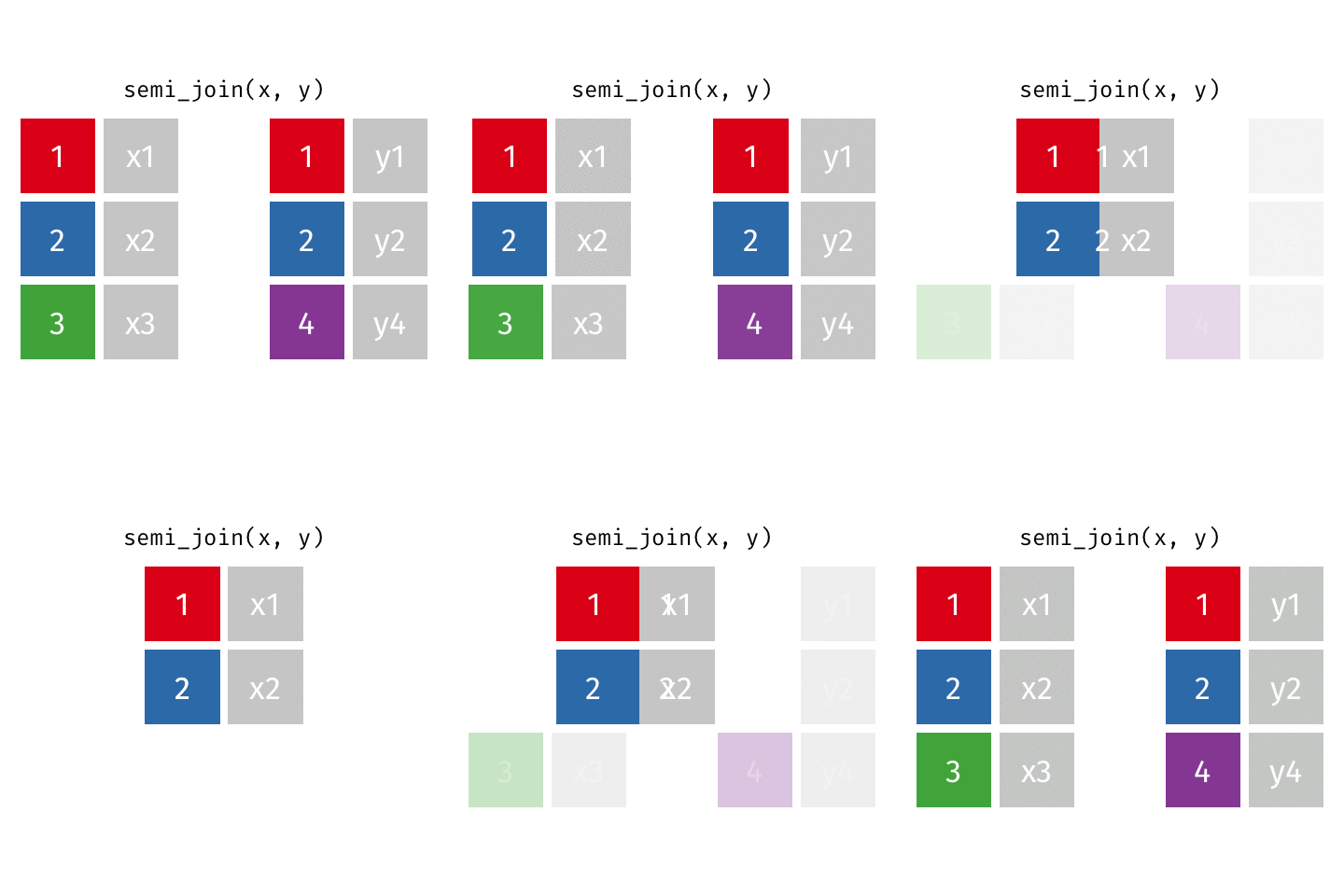
Joining: Semi Join
x
| id | X |
|---|---|
| 1 | X1 |
| 2 | X2 |
| 3 | X3 |
y
| id | Y |
|---|---|
| 1 | Y1 |
| 2 | Y2 |
| 4 | Y4 |
semi_join(x, y)
| id | X |
|---|---|
| 1 | X1 |
| 2 | X2 |
Joining: Semi Join
x
| id | X |
|---|---|
| 1 | X1 |
| 2 | X2 |
| 3 | X3 |
y
| id | Y |
|---|---|
| 1 | Y1 |
| 2 | Y2 |
| 4 | Y4 |
semi_join(x, y)
| id | X |
|---|---|
| 1 | X1 |
| 2 | X2 |
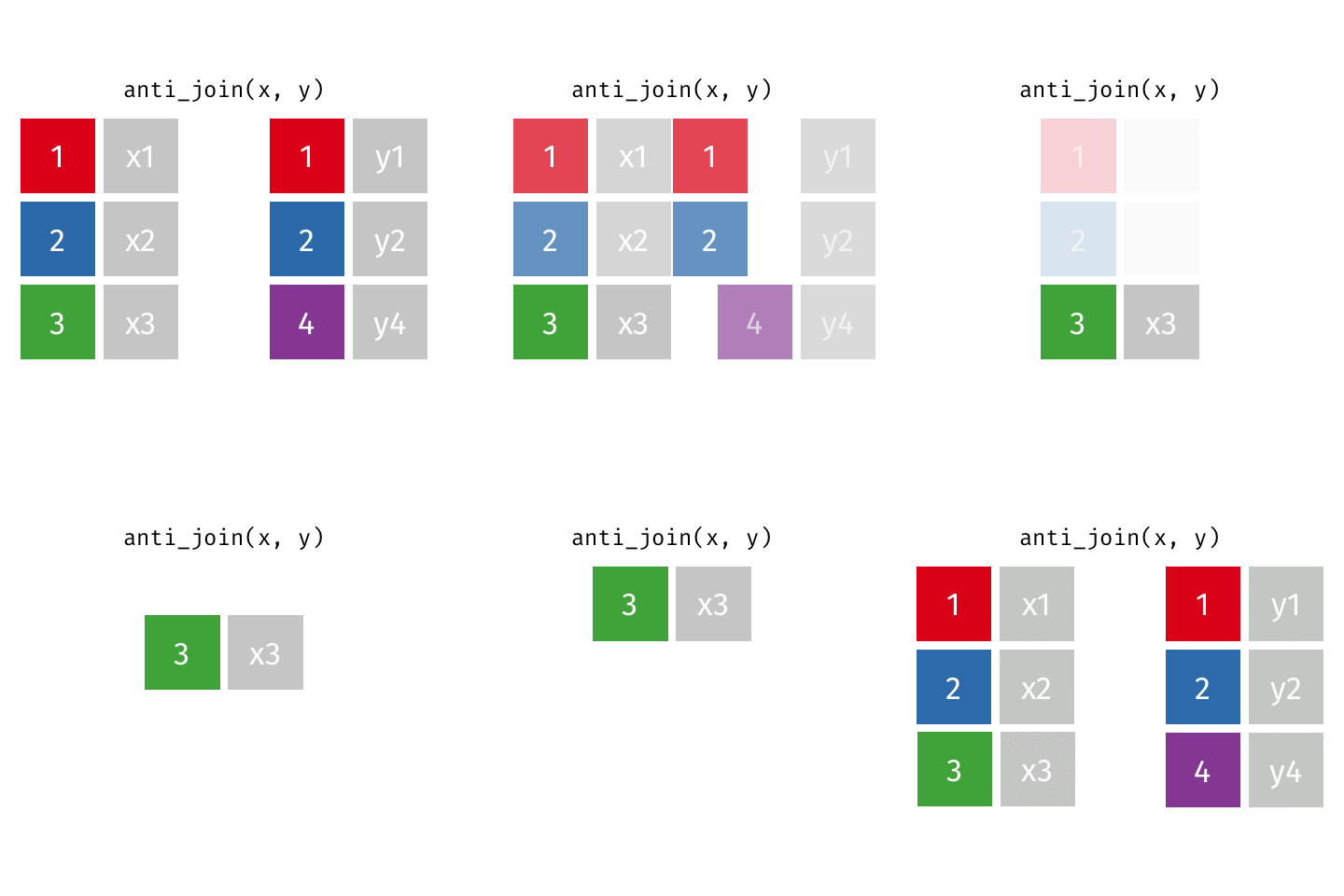
Joining: Anti Join
x
| id | X |
|---|---|
| 1 | X1 |
| 2 | X2 |
| 3 | X3 |
y
| id | Y |
|---|---|
| 1 | Y1 |
| 2 | Y2 |
| 4 | Y4 |
anti_join(x, y)
| id | X |
|---|---|
| 3 | X3 |
Joining: Anti Join
x
| id | X |
|---|---|
| 1 | X1 |
| 2 | X2 |
| 3 | X3 |
y
| id | Y |
|---|---|
| 1 | Y1 |
| 2 | Y2 |
| 4 | Y4 |
anti_join(x, y)
| id | X |
|---|---|
| 3 | X3 |
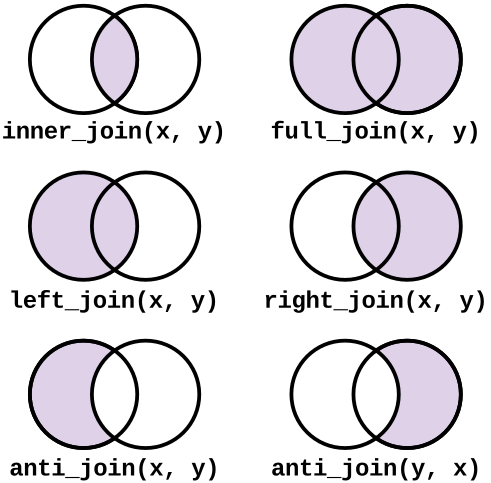
Summary of Join Types
More Notes on Join
In the following examples, I use left_join() to demonstrate
The same concept holds for other types of joins!
Idea: how do we specify which columns we want to join with?
Join: Which columns?
How can I specify which column to join by?
x
| id_X | X |
|---|---|
| 1 | X1 |
| 2 | X2 |
| 3 | X3 |
y
| id_Y | Y |
|---|---|
| 1 | Y1 |
| 2 | Y2 |
| 4 | Y4 |
goal: left join
| id_X | X | Y |
|---|---|---|
| 1 | X1 | Y1 |
| 2 | X2 | Y2 |
| 3 | X3 | NA |
left_join(x, y,
          by = join_by(id_X == id_Y))
What about the pipe?
The following two pieces of code are equivalent:
left_join(x, y,
          by = join_by(id_X == id_Y))
x |> left_join(y,
by = join_by(id_X == id_Y))Let’s save!
Most often, you will want to save the result of a join to a new data frame.
x_y <- x |> left_join(y,
                      by = join_by(id_X == id_Y))
Another potential scenario…
In some cases, it may be helpful to join a dataset with itself
When joining a dataset with itself, since the “left” and “right” data frames are exactly the same,
inner_join(),left_join(),right_join(), andfull_join()will “collapse” to the same solutionTo demonstrate the utility, I will proceed with
inner_join()
Joining a data frame with… itself?
“Toy” prescription data frame
rx_data# A tibble: 7 × 4
patid ndc_code rx_start rx_end
<dbl> <chr> <date> <date>
1 1001 00074-4333 2025-01-01 2025-01-03
2 1001 00074-4333 2025-01-04 2025-01-30
3 1001 54868-5277 2025-02-10 2025-03-05
4 1002 59011-4420 2025-03-01 2025-03-15
5 1002 59011-4420 2025-03-20 2025-04-10
6 1003 00406-0512 2025-04-05 2025-04-07
7 1003 00406-0512 2025-04-08 2025-05-01Joining a data frame with… itself?
Why the suffix = argument? What about the warning?
# Join the data to itself by patient ID
rx_permute <- rx_data |>
  inner_join(
    rx_data,
    by = "patid",
    suffix = c("_ref", "_comp")
  )
Warning in inner_join(rx_data, rx_data, by = "patid", suffix = c("_ref", : Detected an unexpected many-to-many relationship between `x` and `y`.
ℹ Row 1 of `x` matches multiple rows in `y`.
ℹ Row 1 of `y` matches multiple rows in `x`.
ℹ If a many-to-many relationship is expected, set `relationship =
"many-to-many"` to silence this warning.Joining a data frame with… itself?
# Join the data to itself by patient ID
rx_permute <- rx_data |>
  inner_join(
    rx_data,
    by = "patid",
    suffix = c("_ref", "_comp"),
    relationship = "many-to-many"
  )

rx_permute
# A tibble: 17 × 7
patid ndc_code_ref rx_start_ref rx_end_ref ndc_code_comp
<dbl> <chr> <date> <date> <chr>
1 1001 00074-4333 2025-01-01 2025-01-03 00074-4333
2 1001 00074-4333 2025-01-01 2025-01-03 00074-4333
3 1001 00074-4333 2025-01-01 2025-01-03 54868-5277
4 1001 00074-4333 2025-01-04 2025-01-30 00074-4333
5 1001 00074-4333 2025-01-04 2025-01-30 00074-4333
6 1001 00074-4333 2025-01-04 2025-01-30 54868-5277
7 1001 54868-5277 2025-02-10 2025-03-05 00074-4333
8 1001 54868-5277 2025-02-10 2025-03-05 00074-4333
9 1001 54868-5277 2025-02-10 2025-03-05 54868-5277
10 1002 59011-4420 2025-03-01 2025-03-15 59011-4420
11 1002 59011-4420 2025-03-01 2025-03-15 59011-4420
12 1002 59011-4420 2025-03-20 2025-04-10 59011-4420
13 1002 59011-4420 2025-03-20 2025-04-10 59011-4420
14 1003 00406-0512 2025-04-05 2025-04-07 00406-0512
15 1003 00406-0512 2025-04-05 2025-04-07 00406-0512
16 1003 00406-0512 2025-04-08 2025-05-01 00406-0512
17 1003 00406-0512 2025-04-08 2025-05-01 00406-0512
# ℹ 2 more variables: rx_start_comp <date>, rx_end_comp <date>Joining a data frame with… itself?
Now, I can calculate the time-gap (in days) between each patient’s prescriptions
This might be helpful if I’m considering imputing (i.e., filling in missing data) data in between prescriptions
Or, if I have Rx fill data and I’m trying to measure adherence (i.e., is a patient picking up their refills in a timely manner, or are they going days / weeks without medication?)
# Keep only records where the comparison prescription starts later
rx_permute |>
  filter(rx_start_comp > rx_end_ref) |>
  # Calculate the gap between prescriptions
  mutate(
    gap_days = as.numeric(rx_start_comp - rx_end_ref)) |>
  select(patid, rx_end_ref, rx_start_comp, gap_days)
# A tibble: 5 × 4
patid rx_end_ref rx_start_comp gap_days
<dbl> <date> <date> <dbl>
1 1001 2025-01-03 2025-01-04 1
2 1001 2025-01-03 2025-02-10 38
3 1001 2025-01-30 2025-02-10 11
4 1002 2025-03-15 2025-03-20 5
5 1003 2025-04-07 2025-04-08 1AE 07
Goal: Practice with joins!